


Disc Golf Network
Disc Golf Pro Tour
I came to Disc Golf Network looking for a more direct way to follow professional disc golf from my phone, rather than treating live coverage as something I had to catch only when I was near a television or a computer. The app is built by Disc Golf Pro Tour and sits firmly in the sports category, with the simple promise of bringing disc golf coverage into a mobile viewing routine. That focus is its biggest strength: it is not trying to become a general sports hub.
My first impression was that this is best understood as a viewing companion for people who already care about disc golf. If you regularly follow tournaments, want a dedicated place for coverage, or enjoy keeping up with the sport while away from home, the app has a clear purpose. If you only play casually and rarely watch events, its narrow focus may feel less useful than a broader video or sports app.
From wanting live coverage to actually watching
The starting condition is familiar. I might be planning a round, waiting for friends at a course, or simply having a quiet afternoon when I want to see how high-level players handle difficult lines, wind, pressure, and putting situations. A general video platform can sometimes help, but it usually mixes tournament coverage with unrelated clips. Disc Golf Network feels more intentional because the entire experience is centered on disc golf viewing.
The app is free to install, which makes the first step easy for someone who wants to explore it without committing immediately. It is available for devices running Android 8.0 or later, so people using older phones should check compatibility before planning around it. The Everyone content rating also makes it approachable for households where younger viewers may be watching alongside experienced disc golfers.
That low entry barrier matters, but it should not be confused with a completely cost-free viewing experience. The app includes in-app purchases ranging from $5.99 to $199.99 per item. I would therefore treat installation as an opportunity to inspect the available viewing options, not as a guarantee that every piece of coverage is included without payment. The sensible approach is to decide what you actually want to watch before buying anything.
Related News

Why WhatsApp Messenger Still Makes Everyday Communication Feel Easy

Jurassic World: The Game Is the Better Dino Tycoon for Strategic Players

Threads in Real Life: Who Should Join, Lurk, or Leave

How SHEIN Turned Shopping Into an Endless Content Feed

How to Make Fortnite Feel Smarter on Mobile

Should You Switch to Microsoft Outlook on Mobile?
For me, the most useful mindset is to install it before an event or a planned viewing session, not at the exact moment coverage begins. That gives me time to sign in if needed, look around the interface, and make sure the phone is ready. A few minutes of preparation can prevent the frustrating situation of trying to solve account or payment questions while a round is already underway.
How I would use it during an ordinary day
Imagine a Saturday when I have finished my own round but still want more disc golf. I open the app at home, browse what is available, and choose the coverage that matches my interest. If I am watching casually, the phone is enough. If I want to study decisions and technique, I would move to a larger screen when possible or keep the phone close so I can focus on individual shots.
That distinction is important. A phone is excellent for checking in during a break, following part of a round while traveling, or watching from a quiet corner. It is less comfortable for a long, detail-heavy session if I am trying to follow every player and every hole. The app can be the entry point, but the quality of the overall experience still depends on the screen, audio, connection, and viewing environment around it.
Gallery
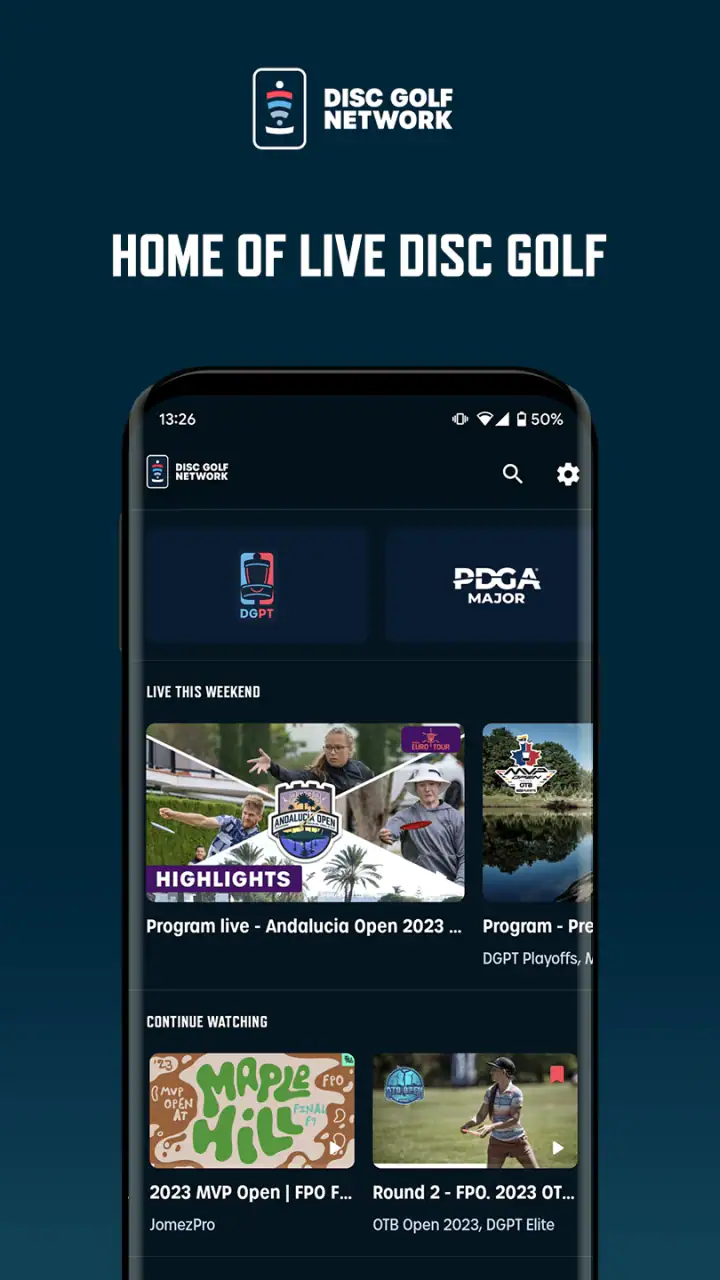
I also see a practical use for players who want to turn professional coverage into a learning tool. Instead of watching passively, I can pause mentally before a shot and ask what line I would choose, then compare that decision with the professional attempt. That is more valuable than simply leaving a tournament playing in the background. The app becomes a bridge between watching and practicing, especially when I pay attention to course management rather than only spectacular throws.
The viewing flow and the small decisions that improve it
Once I have opened the app, I would first separate discovery from commitment. I want to know what is available, how the coverage is organized, and whether the event or program I care about is accessible through the option I am considering. This is a better workflow than immediately selecting the most prominent purchase prompt, because dedicated sports services often contain different kinds of access and viewing choices.
A useful habit is to decide whether I am looking for a live moment, a replay, or general tournament material. Those are different needs. Live viewing is about timing and immediacy; replay viewing is about flexibility; broader content is about keeping up with the sport between major sessions. Thinking in those terms helps me judge the app fairly instead of expecting every screen to serve the same purpose.
Another non-obvious tip is to plan around attention, not just availability. If I only have ten minutes, I may use the app as a quick check-in. If I have a full afternoon, I would prepare headphones, a charger, and a stable place to watch. That sounds basic, but mobile sports viewing can become irritating when battery drain, notifications, or poor audio interrupt the part of the round I actually wanted to see.
For players, I would keep a short note beside me while watching. I might record a decision that surprised me, a type of angle that worked, or a mistake caused by choosing too aggressive a line. This turns the app from a passive stream into a personal study session. The value is not that the app teaches a formal lesson; the value is that its dedicated subject makes it easier to stay focused on details relevant to disc golf.
There is also a trade-off between convenience and concentration. Watching on a phone makes it easy to move around, but that same convenience encourages multitasking. If I am checking messages every few minutes, I will miss the context around a shot and may come away with a shallow impression of the round. For meaningful viewing, I get more from putting the phone on a stand and treating the session like a real broadcast.
Where the handoffs happen
The app is only one part of the journey. The first handoff is from the app to the account or purchase process. That is where a free installation can become a paid viewing decision, and it is the point at which I would slow down and read the offer carefully. The broad purchase range means the financial commitment can vary substantially, so I would not assume that the cheapest option is automatically the right one or that the most expensive one is necessary.
The next handoff is from the phone to the viewing setup. On a small display, I may accept a quick session, but for a serious tournament watch I would prefer a larger screen or a more comfortable position. If the app supports the viewing method I want on my particular device, that can make the experience feel much more natural. If not, I would use the phone as the main screen rather than building my plans around a feature I have not personally checked.
A third handoff is from watching to discussing. Disc golf is often social: I may watch with friends, compare decisions after a round, or send someone toward a particular event. The dedicated focus helps here because I am not sorting through an enormous amount of unrelated sports material. However, the usefulness of that handoff depends on whether the people I am watching with are already interested in disc golf. For a mixed group, a general sports service may be easier to share.
The final handoff is from professional coverage back to my own play. This is where I think the app can justify its place on a serious player’s phone. I can take one idea from the broadcast and test it later, but I should avoid copying a professional throw without considering my own skill, discs, and course conditions. The best takeaway is usually a decision-making principle, such as choosing a safer landing area, not an attempt to imitate an elite player’s exact technique.
What the result feels like when it works
When the workflow goes smoothly, I end up with a focused way to follow disc golf rather than a scattered collection of clips. The app’s identity is clear, and that clarity is useful. I know why I opened it, what kind of content I am seeking, and how it fits into a day built around the sport.
The dedicated approach also helps people who feel underserved by general sports apps. A broad platform may give me occasional disc golf videos, but it rarely feels designed around the rhythm of a tournament or the interests of someone who understands why a placement shot matters. Here, the subject itself is the organizing principle, which makes the experience more relevant for committed fans.
Its audience appears substantial, with over 100 thousand installs, but the average rating is only 1.9 from around 1.7 thousand ratings. I would not treat that score as a complete verdict, because app ratings can reflect device issues, account frustrations, payment expectations, or differences between what users thought they were getting and what the service actually offers. Still, it is a clear reason to approach the app with realistic expectations and test the basic flow before spending money.
The review volume is also notable, with around 668 written reviews. That suggests users have had enough varied experiences to raise both practical praise and frustration. I would pay particular attention to recurring comments about access, playback, and reliability when deciding whether the app suits my own setup. Those are the areas that can turn a promising sports service into a poor evening of viewing, even when the underlying coverage is exactly what I wanted.
For a dedicated fan, the result can be worthwhile because the app reduces the distance between wanting to follow disc golf and finding disc golf coverage. For a casual player, the result may be less dramatic. If I only watch a few highlights each month, I might get more value from the video tools I already use. The specialist focus is an advantage only when I actually want specialist coverage.
Where the workflow breaks down
The first weak point is the gap between “free to install” and the total cost of watching. The app’s purchase range is wide enough that I would be careful about assuming the free download represents the whole experience. Anyone who dislikes subscription-style or event-based sports access should investigate the available choices before becoming invested in the service.
The second weak point is that a dedicated sports app can feel unforgiving when something goes wrong. In a general video app, I may have plenty of alternatives if one clip fails or one broadcast is unavailable. Here, I am opening the app because I want disc golf. If the particular coverage I want is difficult to find, inaccessible, or interrupted, there may be no equally relevant backup inside the same experience.
The third issue is the difference between following a sport and learning a sport. The app can provide material that inspires better decisions, but it is not a substitute for practice, coaching, or understanding my own throwing limits. I would skip it as a primary tool if my goal is structured instruction. A dedicated training app, a local coach, or time on the course would be a better choice for that purpose.
I would also hesitate to recommend it to someone who wants a broad sports package. Disc golf is the reason to use this app, not one item among many. If my viewing habits move between football, basketball, tennis, and disc golf, a general service may be more convenient and financially easier to manage. The specialist route makes sense when disc golf is important enough to deserve its own place.
Older-device users should consider the operating-system requirement before downloading. Devices below Android 8.0 are outside the stated minimum, so this is not an ideal choice for someone holding onto an older phone. Even on a compatible device, I would still test the app in the location where I normally watch, because mobile performance depends on more than the operating system alone.
Who should install it and who should pass
I would recommend Disc Golf Network to an active fan who wants a dedicated home for live disc golf viewing and is comfortable checking the available paid access before watching. It is also a reasonable choice for players who enjoy analyzing professional decisions and want a convenient way to keep the sport close between their own rounds.
I would be more cautious with a beginner who is searching for basic throwing instruction. The app may help that person understand the sport’s highest level, but watching professionals does not automatically explain grip, footwork, release angles, or practice progressions. For that user, instructional content and hands-on feedback should come first.
I would also skip it if I only want occasional short clips, if I need one app for many sports, or if I am unwilling to deal with in-app purchase choices. Those are not flaws in the concept; they are signs that the concept may not match my habits. A specialist service earns its place through regular use, not through a single curious download.
My final take after following the full path
Disc Golf Network has a clear role: it brings disc golf viewing into a focused mobile experience for people who want more than scattered highlights. I like that the journey can begin with a free installation and lead naturally into live or dedicated coverage, but I would approach the purchase stage carefully and avoid assuming that every desired viewing option is included automatically.
The app works best when I prepare for it: check compatibility, understand the access choice, choose a comfortable screen, and decide whether I am watching for entertainment or studying the game. Those small decisions make a bigger difference than simply opening the app and expecting it to organize the entire experience for me.
My honest recommendation is conditional but positive for the right audience. If disc golf is already a regular part of your week, this is a sensible specialist app to try. If you are only mildly curious, need formal lessons, or prefer an all-sports platform, I would choose a different route. The low average rating means I would test the basics before paying, but the dedicated purpose remains compelling for committed viewers. It is most valuable when the app is treated as part of a complete disc golf routine, not as a replacement for playing, practice, or careful buying decisions.
FAQs for Disc Golf Network
What is Disc Golf Network?
Disc Golf Network is a streaming and video platform focused on professional disc golf. After exploring the service, I found that it brings live tournament coverage, replays, highlights, interviews, instructional content, and other disc golf programming into one place. It is designed for fans who want more than occasional clips on social media and prefer following competitions throughout the season.
Does Disc Golf Network require a subscription?
Most premium live coverage and full-length programming on Disc Golf Network requires a paid subscription, although selected videos, previews, highlights, and promotional content may be available without one. Before subscribing, check the current plan details, billing period, and included features in your region. Availability and pricing can change, so reviewing the app’s subscription screen is recommended.
Can I watch live disc golf tournaments on the app?
Yes, live tournament coverage is one of the main reasons to use Disc Golf Network. Depending on the event and your subscription, you may be able to watch rounds as they happen, follow scheduled broadcasts, and access coverage after the live stream ends. Event availability can vary by location because of broadcasting rights and regional restrictions.
Which devices support Disc Golf Network?
Disc Golf Network is primarily intended for mobile viewing on compatible Android and iOS devices, while its service may also be accessible through supported web browsers or connected television platforms. Compatibility can depend on your operating system version, device model, and app updates. If you plan to watch on a TV, confirm supported casting or platform options before downloading.
Does Disc Golf Network work offline or use a lot of mobile data?
Disc Golf Network is mainly a streaming service, so an internet connection is generally needed to watch live events and on-demand videos. Offline downloads may not be available for every title or device, and high-quality video can consume considerable mobile data. For longer broadcasts, using Wi-Fi is the safer choice, especially if your cellular plan has a limited data allowance.
Pros
- Live coverage of major disc golf tournaments
- On-demand replays make it easy to catch missed rounds
- Exclusive player interviews and behind-the-scenes content
- Supports watching tournaments on mobile devices
- Regularly updated with new disc golf programming
Cons
- Many premium events require a paid subscription
- Some content may be unavailable in certain countries
- Video quality can depend heavily on your connection
- Live streams may use significant mobile data
- The catalog is focused almost entirely on disc golf


